Hearth & Hall brings membership, reservations, billing, events, and everyday club operations together in one place.
Built for private clubs and the people who keep them running, it helps officers, staff, and members spend less time managing administrative details and more time enjoying everything that makes their club special.
Hearth & Hall helps the people entrusted with your club leave it in better shape than they found it.
Membership
One reliable home for your entire membership.
Manage members, households, invitations, and permissions in one organized directory that reflects how your club actually operates.
Your roster is the center of the product. Membership types match how your bylaws actually work — you name them (Certificate Holder, Active, Guest pricing classes, and so on). Hearth & Hall does not force a one-size-fits-all ladder.
Households. Primaries are the member of record. Linked family members and under-18 sub-accounts bill and often book under that household without separate platform fees for each person.
Invites & sign-in. Invite people by email, set passwords safely, and keep pending memberships visible until they join.
Roles & permissions. Access comes from roles you configure (Board, Treasurer, Hospitality, Steward, and others), plus an Admin flag for emergency administrative access. You control what each role can see and do.
Member directory. Members find each other in an organization directory shaped by your roster rules — not a separate spreadsheet.
Book lodging, meals, and amenities without the spreadsheet scramble.
Stewards and members reserve what the club offers with clear availability, policies, and prices officers can adjust as the season demands.
Catalog the things your club books — lodging, meals, boats, trap, ranges, meeting rooms — with capacity, schedules, policies, and prices that officers can change without a custom build.
Bookable facilities & amenities. Define categories and the individual bookable items under them. Icons, capacity, and availability settings keep the catalog clear for members.
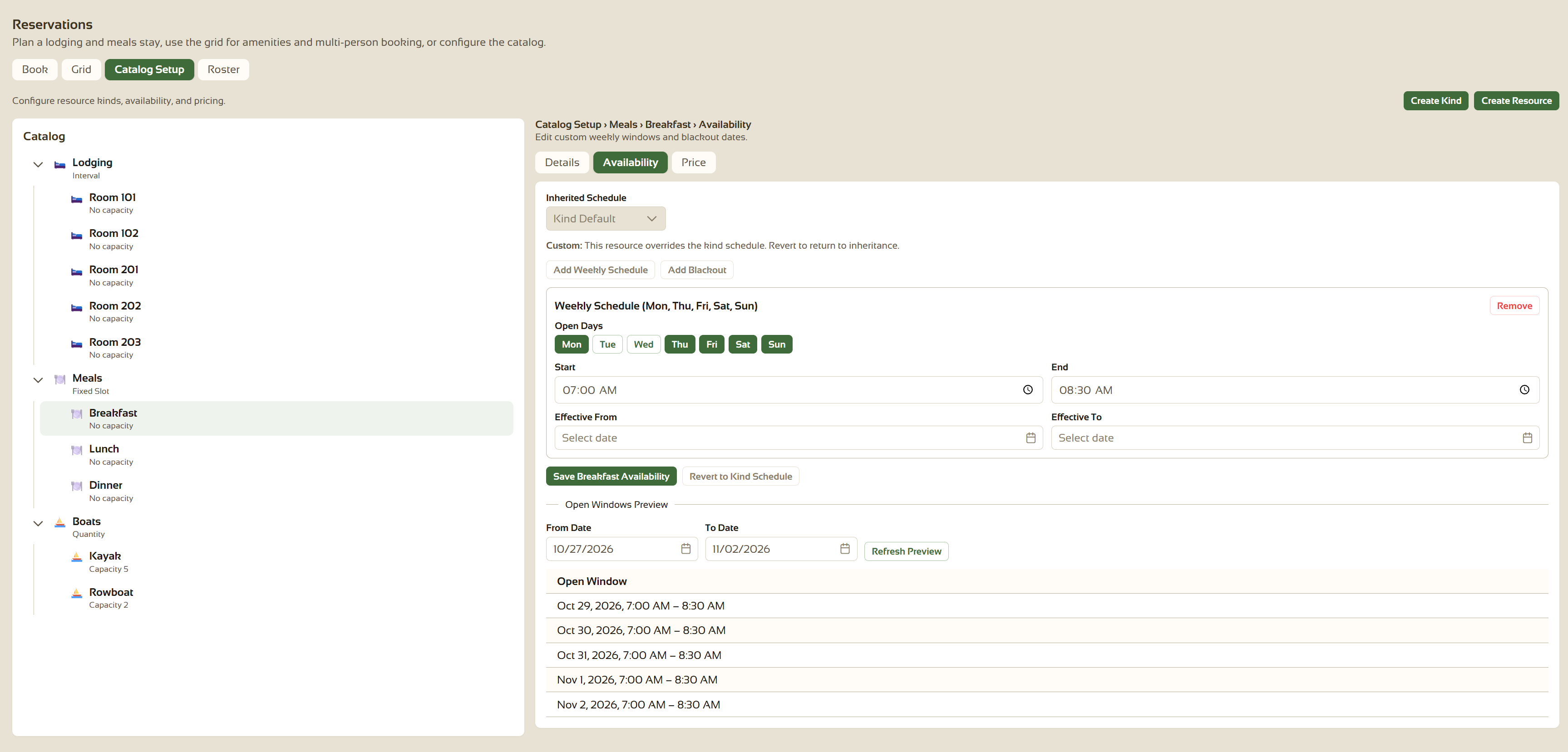
Availability. Weekly windows, seasons, blackouts, and inheritance from category defaults to item-specific overrides so summer and winter calendars do not fight each other.
Policy & pricing. Lead times, who may book for whom, guest rules, and prices that can vary by membership type or date range.
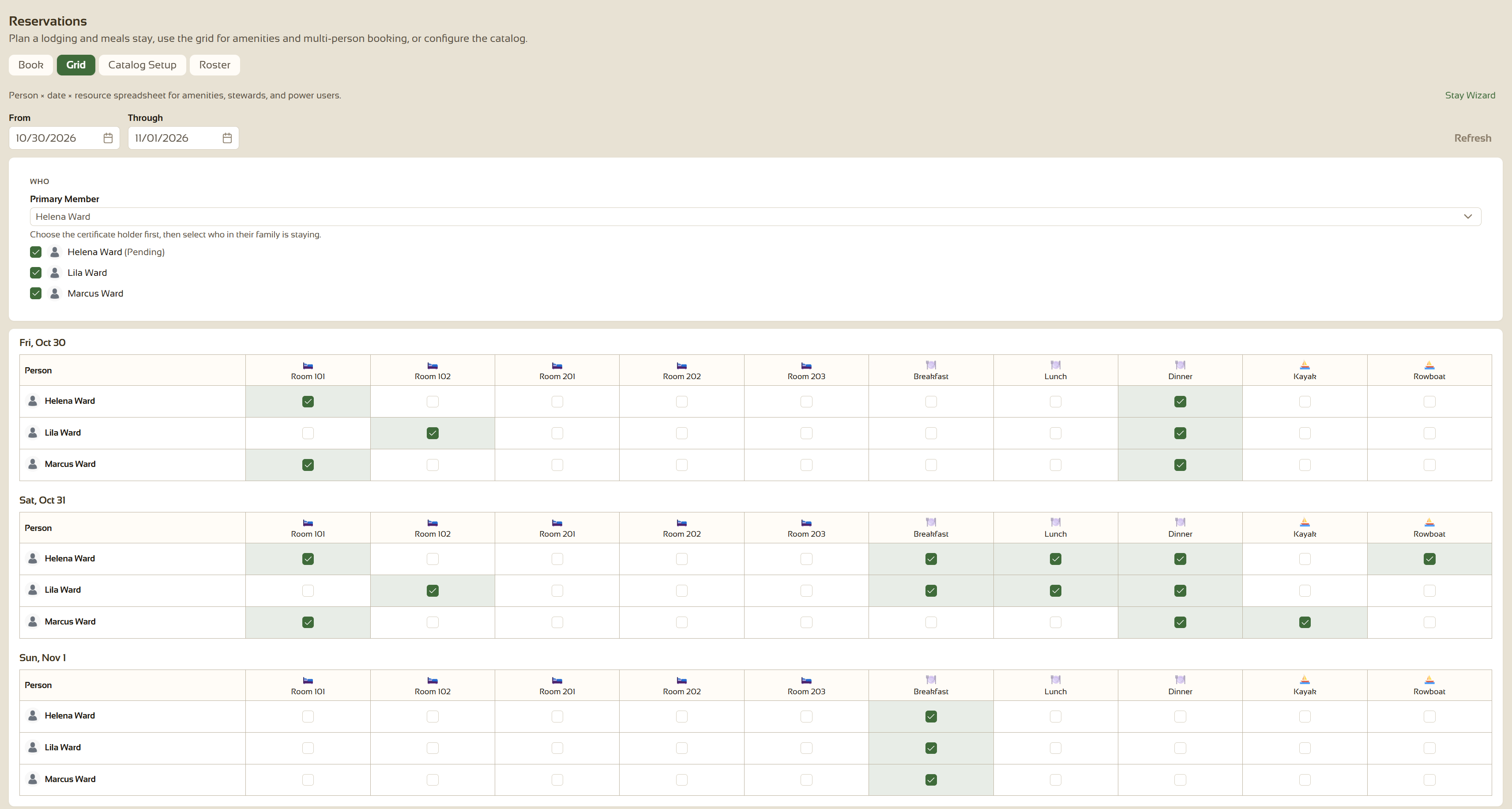
Booking grid. A spreadsheet-style view for stewards and members to hold dates across people and resources, with unavailable cells muted and holds that feed billing when priced.
View full imageBoards and stewards see which lodging and resources are booked.View full imageSchedules and prices live with each lodging room, meal, and shared resource.
Know what's happening — and keep registration under control.
Publish club events, manage registration and waitlists, and see the month in one place alongside reservations.
Answer “what's happening this weekend?” from one calendar — not three tools and a whiteboard — while registration and waitlists stay organized.
Events. Create and announce gatherings with registration capacity and waitlist behavior when seats fill.
Organization calendar. A unified month view of events and reservations, with day detail for officers and members who need the full picture.
Audience. Members register themselves; officers with the right permissions create and manage the calendar without treating a PDF flyer as the official schedule.
Collect dues and charges while member money stays with your club.
Help the treasurer collect promptly — and help members pay without chasing paper — while member card payments settle to your organization, not to us.
Built for club treasurers: priced reservations and catalog charges land on an open tab, a steward prepares an estimate from the lines that are ready, and a treasurer converts that estimate to an invoice. Households have a bill-to, and card payments run through Stripe. Member dues settle to your organization — Hearth & Hall does not collect or hold that money, and does not take a cut of member card charges.
Estimates & invoices. Priced holds and catalog charges sit on the household open tab. Prepare an estimate from the lines that are ready, then convert it to an invoice, send, void, and refund with a clear status trail.
Household bill-to. Sub-accounts and family members resolve to the primary for charges so the treasurer is not chasing every email address in the household.
Payments. Saved payment methods (secure tokens only), card capture, and payment history for the people who need it. Connect onboarding sends live member payouts to the club's Stripe account.
Exports. QuickBooks-oriented file export helps replace re-keying payments into the club's books.
Platform fees. Separately, your organization pays Hearth & Hall for product usage — distinct from club receivables. Standard onboarding is included with no setup fee for day-one configuration.
See Pricing for how platform fees work alongside club billing.
Keep club records where the membership already works.
Store bylaws, minutes, and club files with access control and history — not a shared drive nobody owns.
Keep bylaws, minutes, safety forms, and hunt regulations in a folder library with access control that matches how your club governs itself.
Folders & access. Organize files by topic and limit who can see or upload based on roles and admin settings.
Versions. Upload new versions without losing history when policies or minutes are revised.
Retention & legal hold. Configure retention-oriented settings where the product supports them so clubs can align storage with governance needs (your counsel still sets the legal standard).
Forums, announcements, and member email without juggling a separate forum product, newsletter tool, and inbox for every notice.
Reach the people who need to know — committees, officers, and the membership at large — where they already sign in.
Forums. Category-based discussion for committees and the membership at large.
Announcements. Publish organization-wide notices where members already sign in.
Mailing lists & email members. Compose to lists or audiences shaped by roles and membership types; transactional email covers invites, password flows, and billing notices.
Give stewards and hospitality a seating list they can print, mark on paper, and reconcile later — without inventing a second operations tool.
Day Sheet lists the day's reservations for meals, lodging, and other resources marked for it, and prints a sheet for a day, a three-day window, or a week. Meal Planning shows today and tomorrow meal counts. Both stay read-only.
Ops-ready print. Printer-friendly pages hide app chrome so the sheet works at the host stand.
Role-gated access. Grant report access to Steward or Hospitality roles without opening full catalog administration.
Read-only support. The report does not replace Book or Billing for updates — it supports the people who already run the floor.